Features

Everything a small machine shop runs on, in one place.

Every screenshot below comes from a demo shop running the real software. Features marked Free are in every plan; the rest come with Standard.

On the shop floor In the office Getting started Questions
On the shop floor

Know where every job stands.

The board, the paperwork and the parts, open on any PC, phone or tablet in the shop.

Job board Free

Every job, always visible.

A board built for the shop floor, not a spreadsheet. See what's queued, what's running, what's out for heat treat or plating, and what's ready to ship.

  • Queued, In Progress, Outside Processing and Done columns
  • Overdue and due-today jobs flagged automatically
  • Rush, normal and low priority
  • Several people on one job, with the machine and quantities
  • Outside processing named on the job: heat treat, black oxide, plating, anything
  • New jobs added today called out at the top
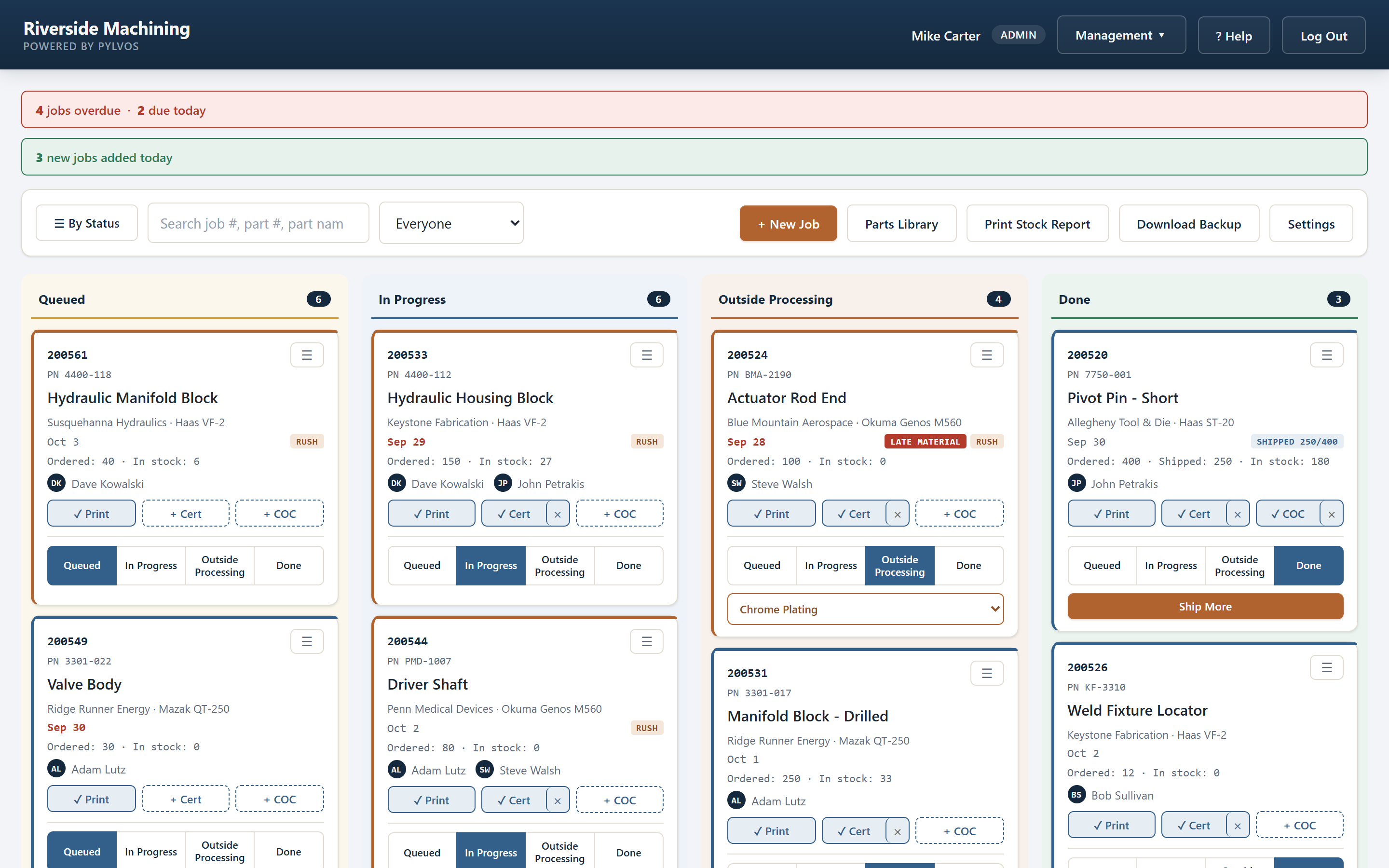
Pylvos job board
Prints, certs and COCs Prints FreeCerts and COCs Standard

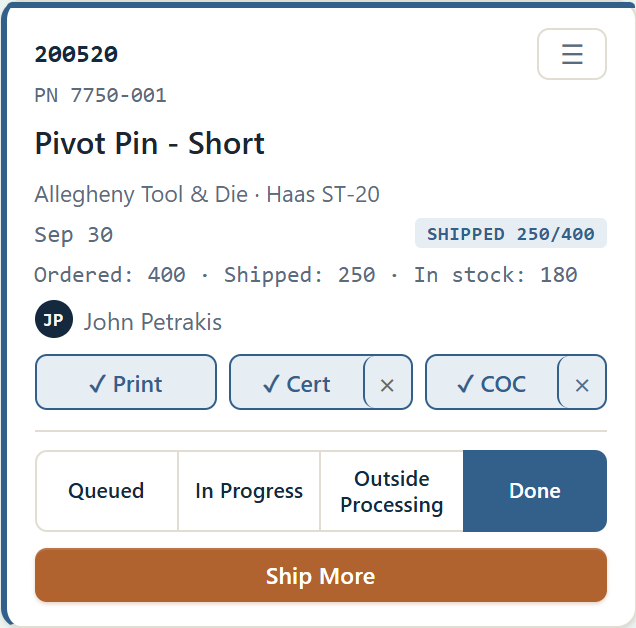
Print, cert, signed COC. One tap each.

Every job card carries its paperwork. Open the part print, the material cert or the signed Certificate of Conformance from the floor or the office. When a customer asks for the COC six months later, it's already there.

  • Print, Cert and COC slots on every job card
  • Print a pre-filled COC, sign it, upload the signed copy
  • Upload a PDF, or a photo straight from your phone
  • No print on file yet? Upload it from the job card and it's saved to the part
  • Included in every backup
A Pylvos job card with print, cert and signed COC
Job history FreeFull history Standard

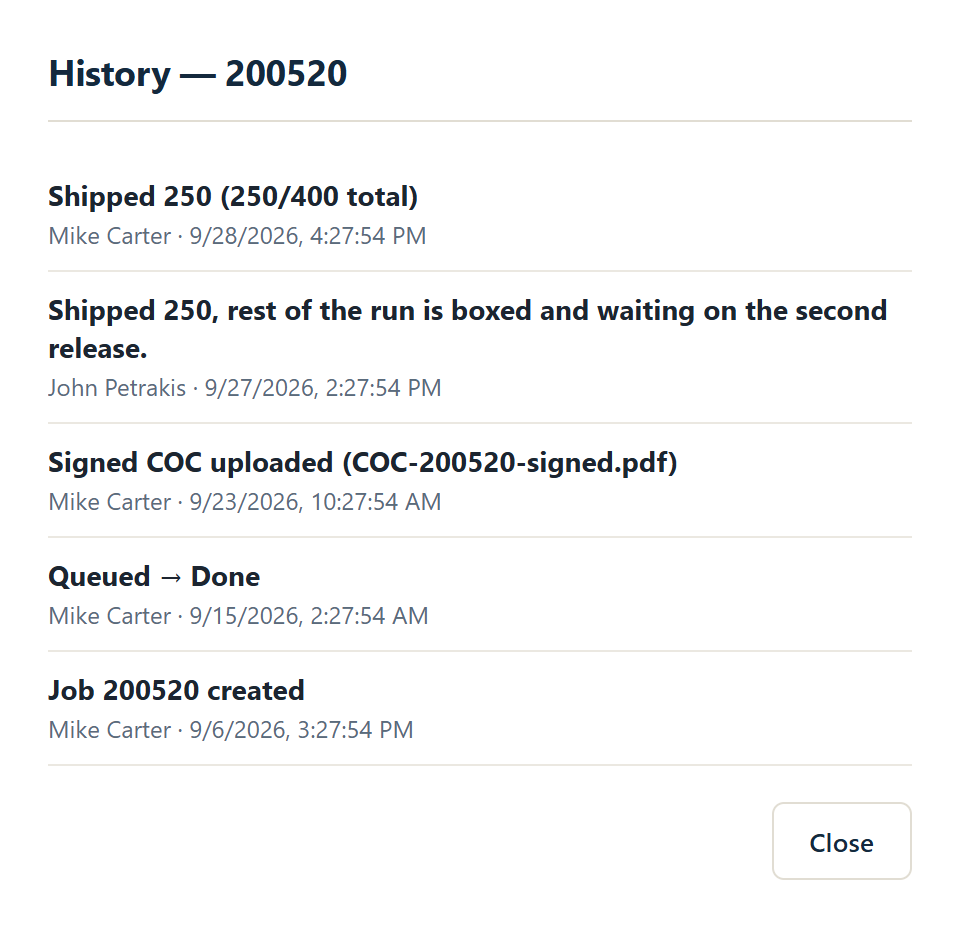
Know exactly what happened, and when.

Every move is logged with who did it and when, from the day the job was created to the day it shipped.

  • Status changes and shipments on every plan
  • Standard adds edits, print uploads, signed COCs and comments
  • Partial shipments logged with running totals
Pylvos job history
Comments and time Comments FreeTime tracking Standard

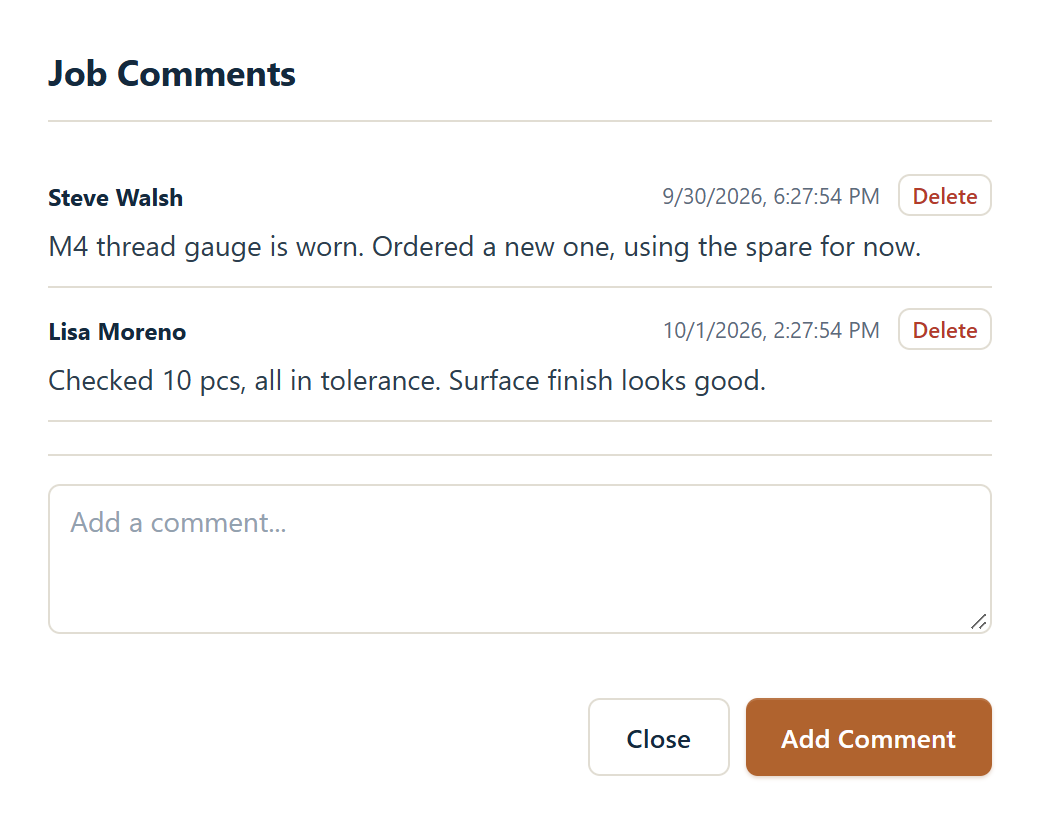
Keep notes where the job is.

Comments live on the job instead of in texts and sticky notes, with the author and the time. Everyone on the job sees the same notes, from the first setup note to the final inspection.

  • Comment thread on every job
  • Log hours against a job; they feed job costing
Pylvos job comments
Calendar Free

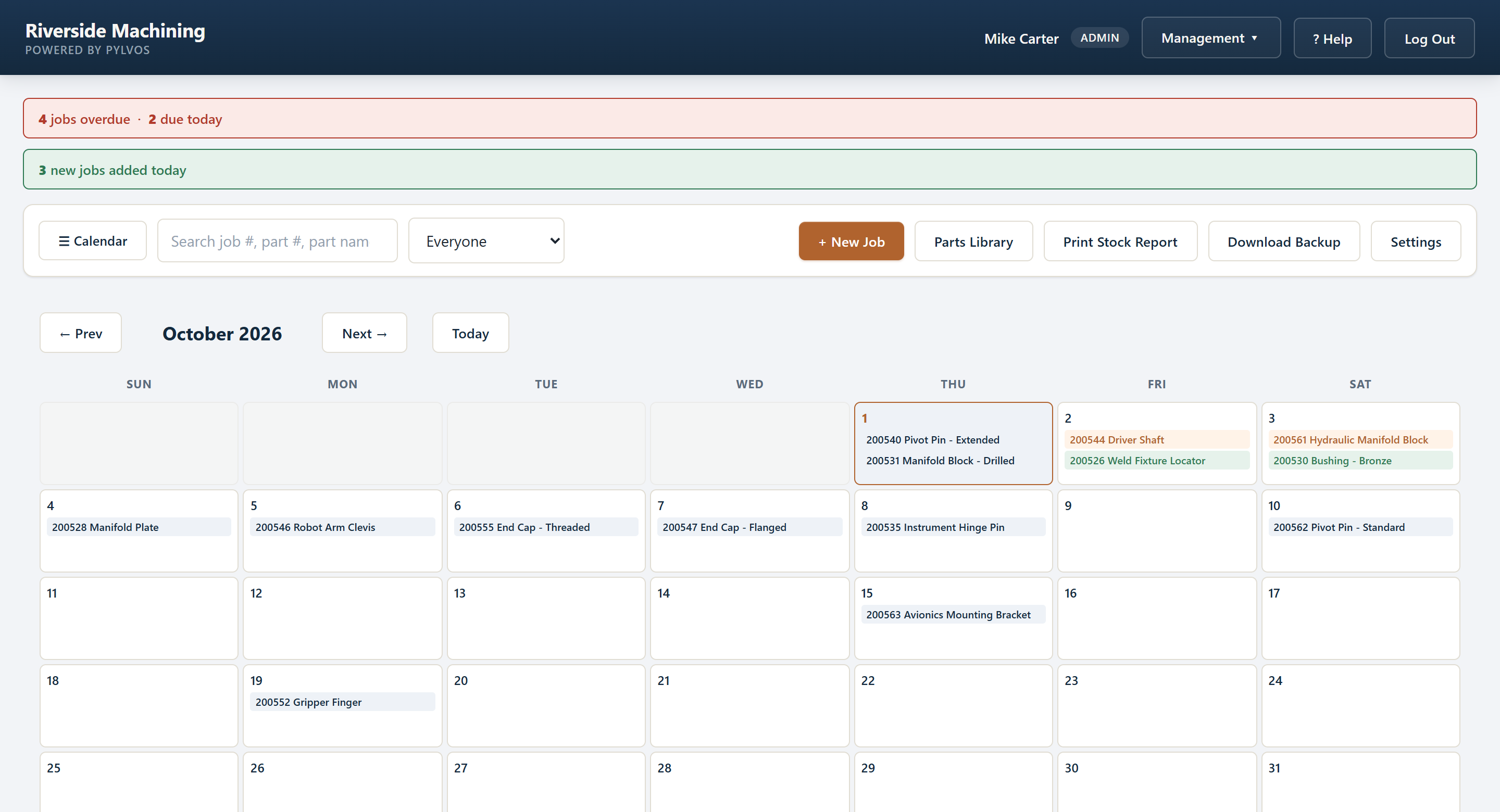
See the whole month at a glance.

Every job on a monthly grid by due date, colored by priority and status, so you can see where the pressure is before it hits the floor.

  • Rush in orange, overdue in red, done in green
  • Click a job for its details without leaving the calendar
  • Previous, next and today controls
Pylvos calendar view
Parts library Free

Your parts and prints, finally organized.

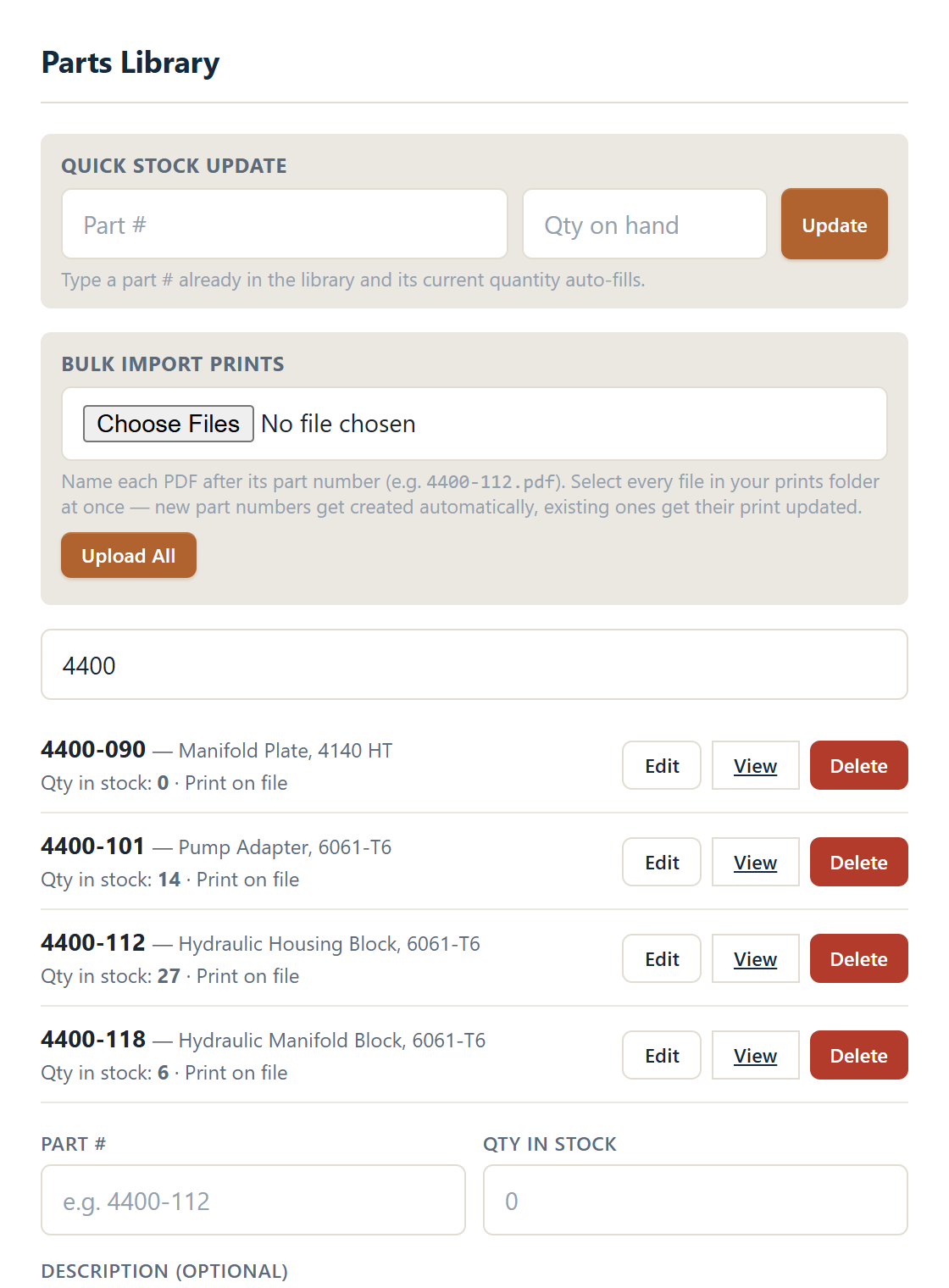
Part numbers, stock on hand and the print for each part, in one searchable list. Import your whole prints folder at once and Pylvos matches each file to its part number.

  • Search by part number or description
  • Quick stock update from the floor
  • Bulk import prints named after their part numbers
  • The Ship dialog offers to update stock as parts go out
Pylvos parts library
Stock report Free

Stock and shipping, ready to print.

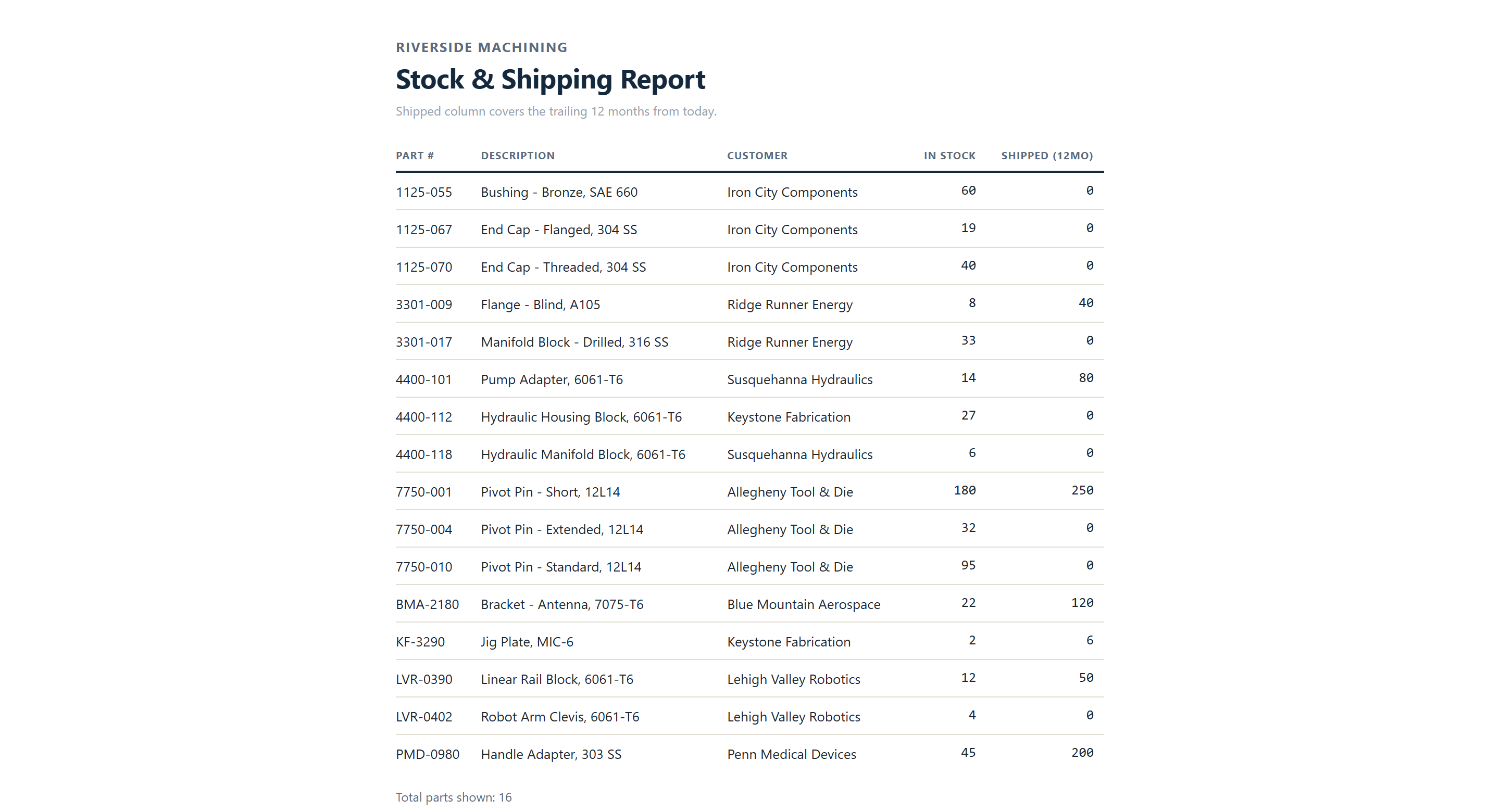
Every part's stock on hand and how many shipped in the last 12 months, with the customer each part runs for. One click, clean printout with your shop name.

Pylvos stock and shipping report
Phones and tablets Free

Open it on any phone. No setup.

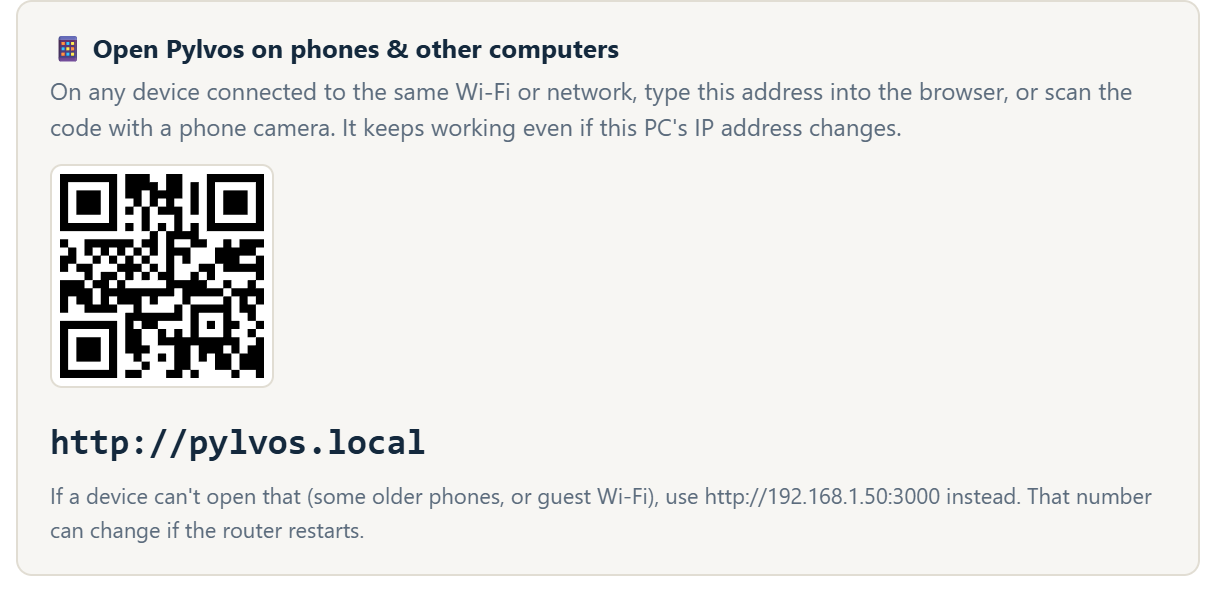
Once Pylvos runs on your shop PC, every phone, tablet and computer on your Wi-Fi opens it at pylvos.local. Scan the QR code in Settings and you're in, and it keeps working when the PC's address changes.

  • No router settings and no fixed IP address
  • Install it as an app on Windows, or add it to a phone's home screen
  • No cloud login for your team
Pylvos Settings with the pylvos.local address and QR code
In the office Standard

Quote it, buy for it, ship it, get paid.

The office side of the shop lives in a Management panel, so prices and margins stay out of sight of the floor.

Quoting

Price from real labor and material.

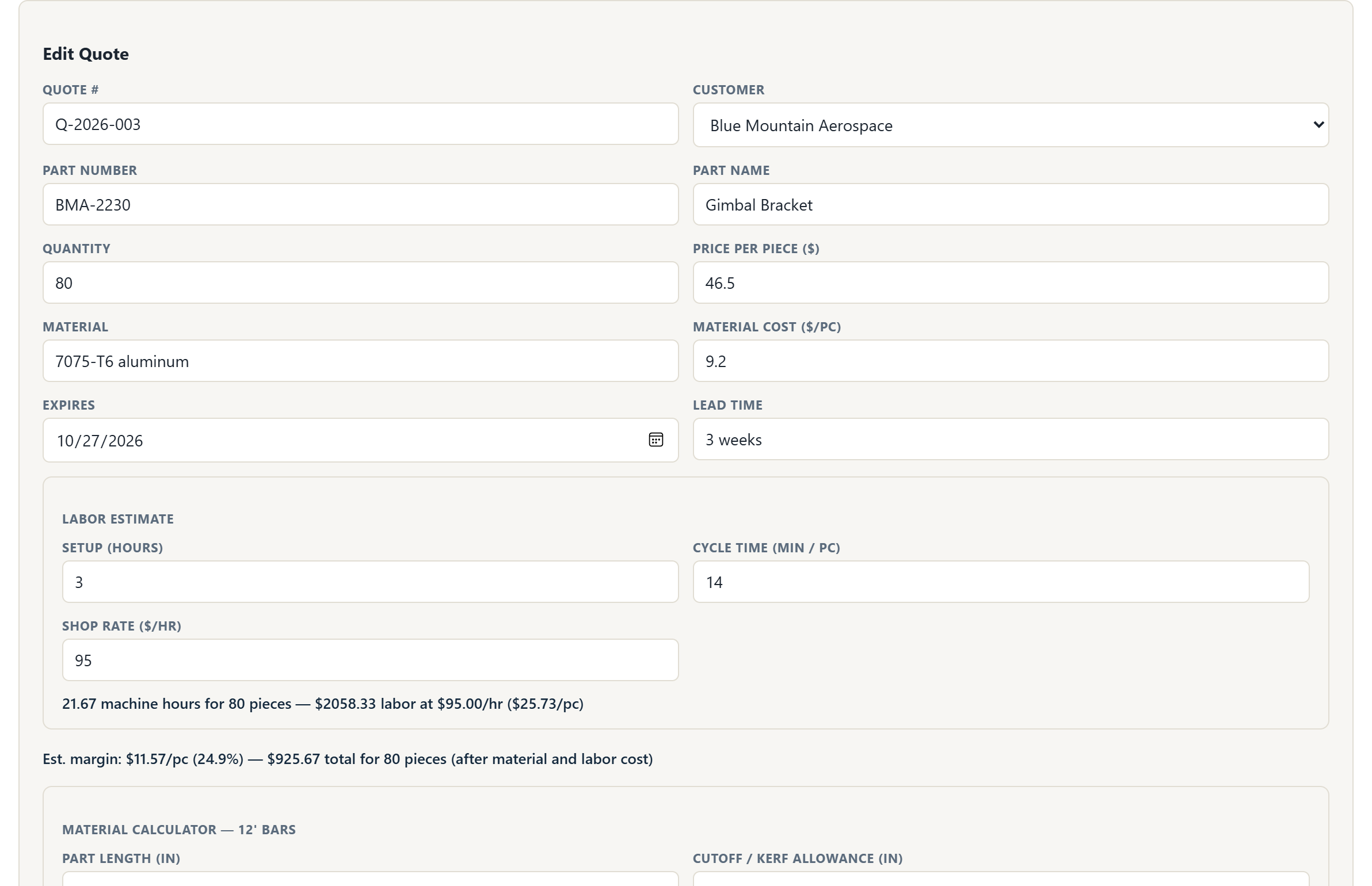
Build quotes inside Pylvos, see the margin before you send them, and turn the winners into jobs in one click.

  • Auto-numbered quotes (Q-2026-001, Q-2026-002…)
  • Setup hours and cycle time give machine hours, labor cost and a live margin
  • Material cost per piece, with a 12-foot bar calculator
  • Lead time, expiry date and the customer's RFQ drawing on the quote
  • Draft, Sent, Accepted or Rejected, and your win rate
  • Convert an accepted quote to a job with everything filled in
Pylvos quote builder with labor estimate and margin
Printable quotes and POs

Send it out looking professional.

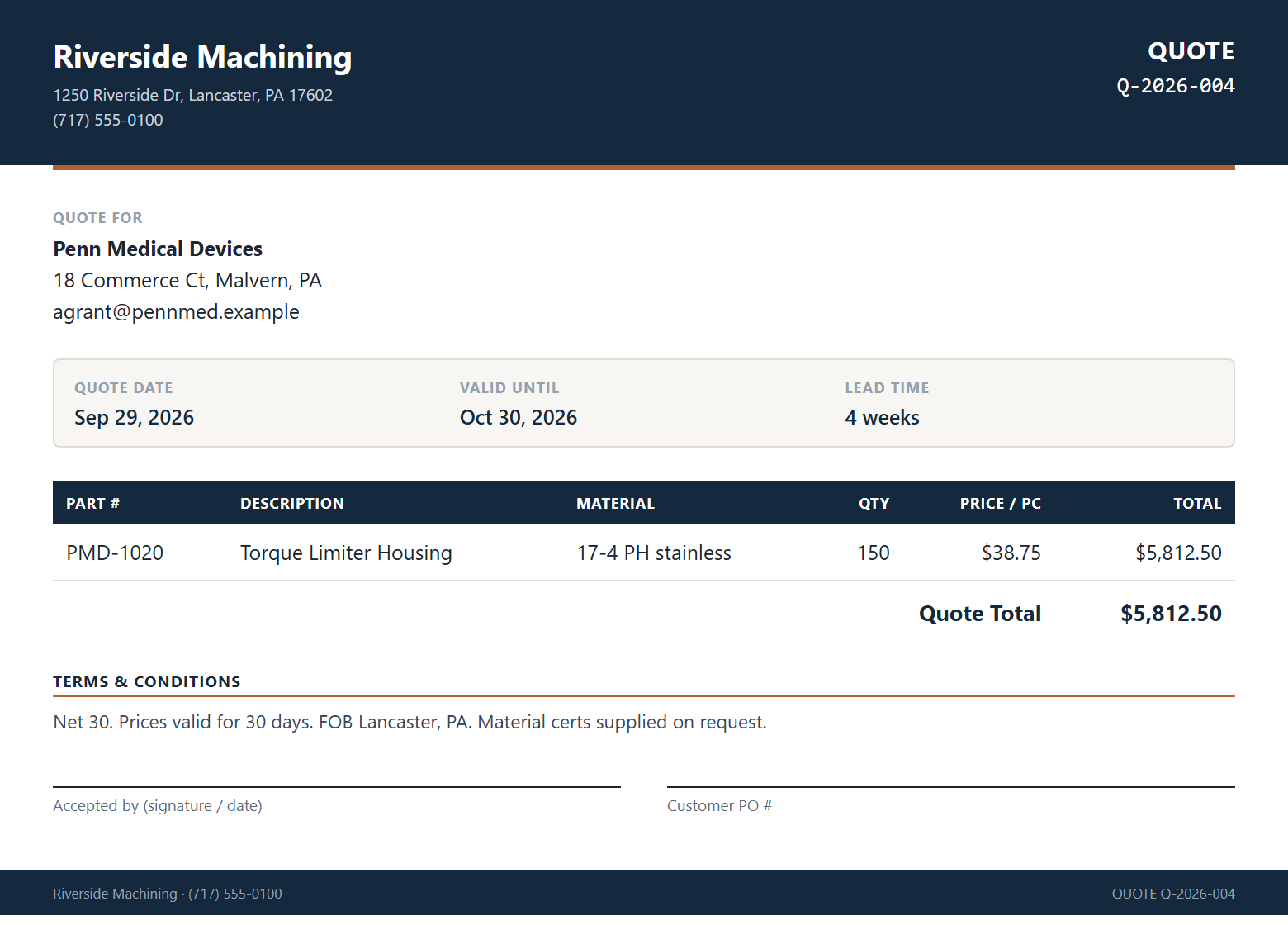
One click turns a quote or a purchase order into a clean page with your shop's name and address, ready to print or save as a PDF. Your terms print automatically, with signature lines.

  • Quotes with lead time, valid-until date and your terms
  • Purchase orders with the supplier's details
  • Set your shop rate and quote terms once, in Settings
A printed Pylvos quote
Purchase orders

Track every PO from issue to received.

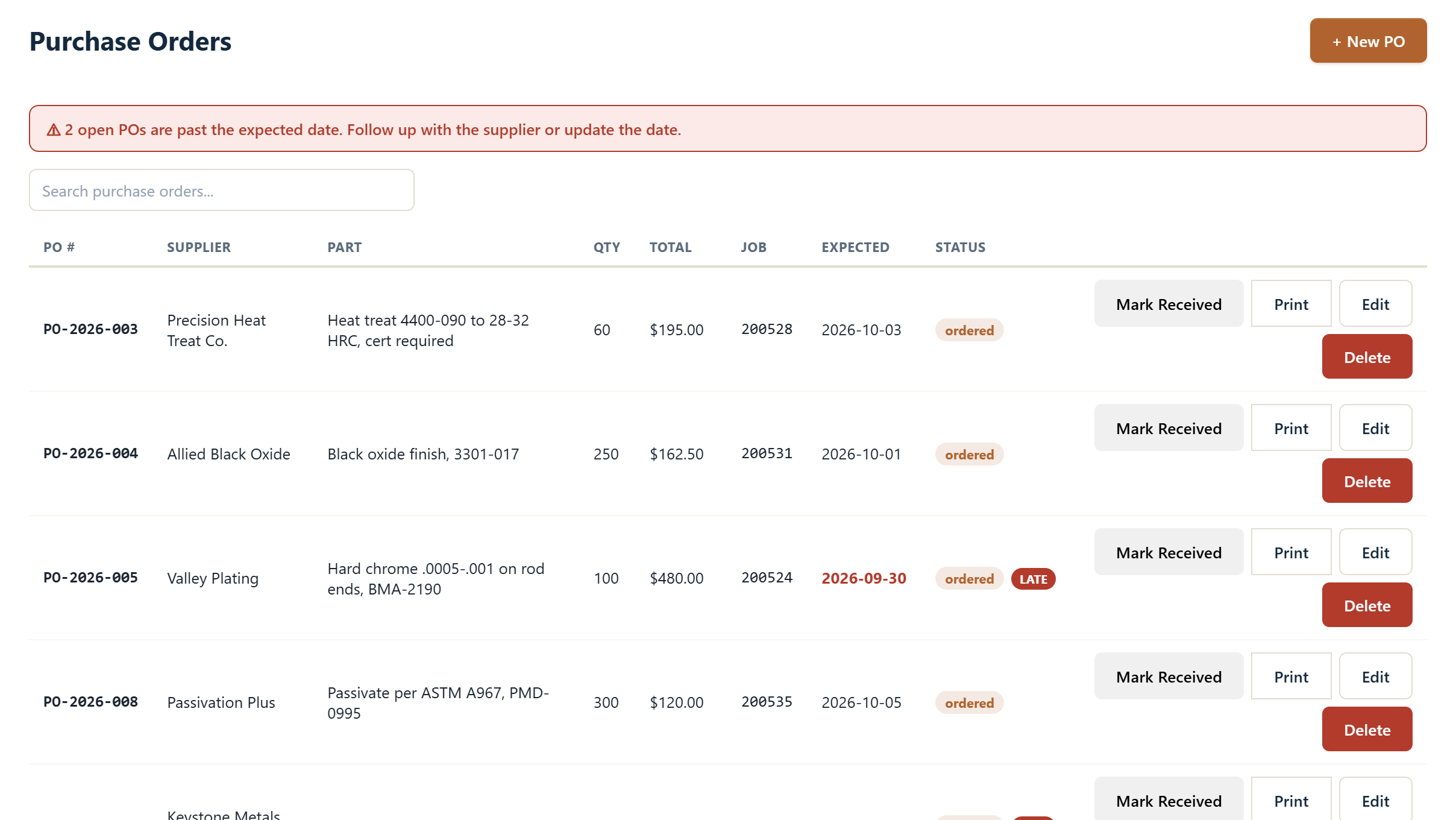
Purchase orders tied to the job they're for, printed for your supplier and marked received when material lands. A late PO flags its job on the board.

  • Auto-numbered POs, linked to a customer and a job
  • Late POs called out, with LATE MATERIAL on the job card
  • Lot price or unit price, plus internal notes that never print
  • PO costs feed straight into job costing
Pylvos purchase orders with a late PO warning
Suppliers

Know who actually delivers.

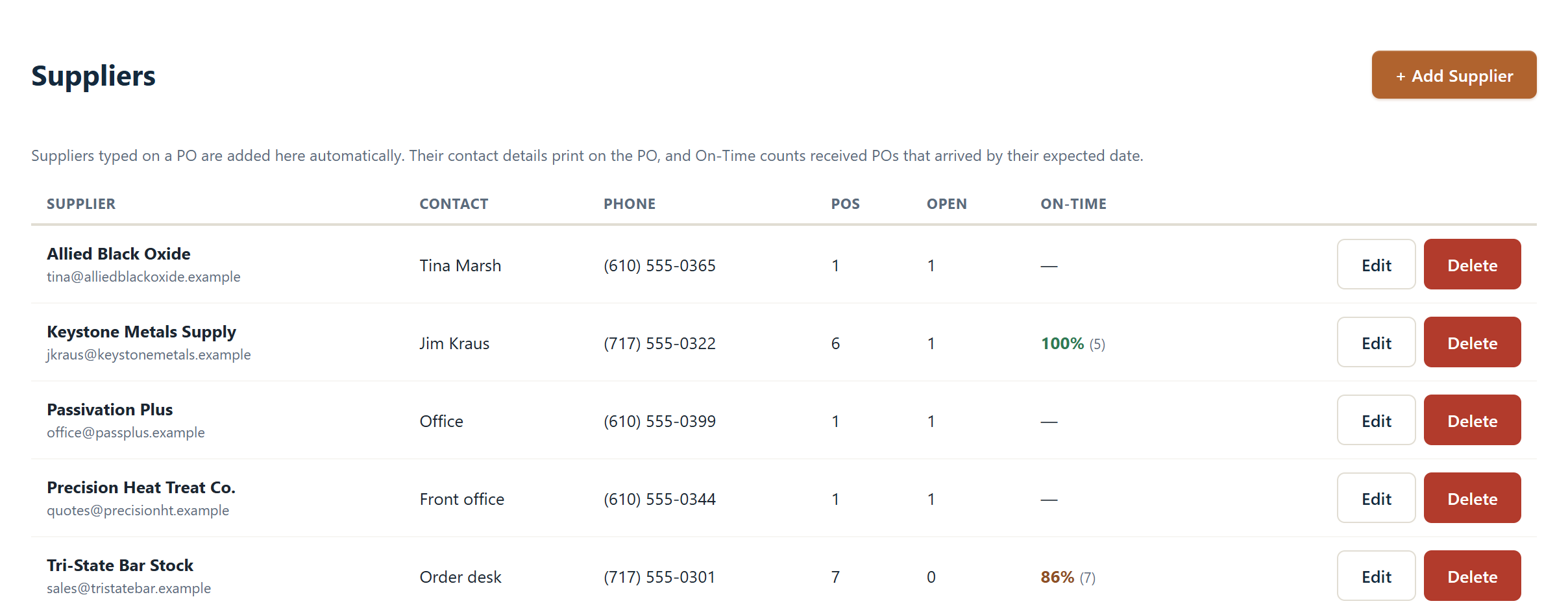
Suppliers you type on a PO are saved automatically, so your vendor list builds itself. Pylvos tracks how often each one delivers by the date you expected.

  • Contact name, phone and address on file and on the printed PO
  • Open and total POs for every supplier
  • On-time delivery rate
Pylvos supplier list with on-time delivery rate
Customers

Every customer, one screen.

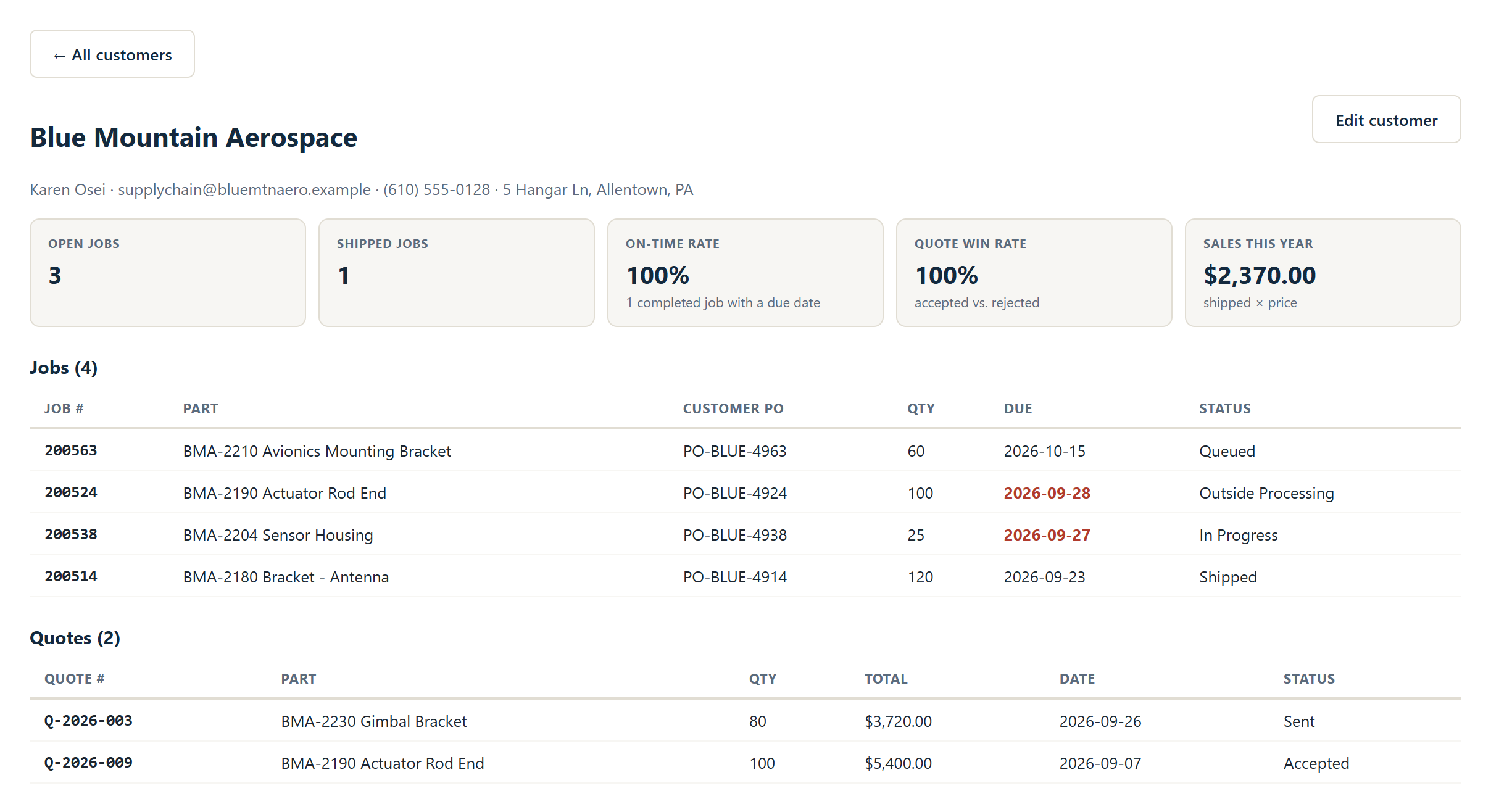
Open a customer to see their open and shipped jobs, on-time rate, quote win rate and sales for the year, with every job and quote listed underneath.

  • Customer PO number on every job, printed on the COC and traveler
  • Contacts kept with the customer
Pylvos customer summary
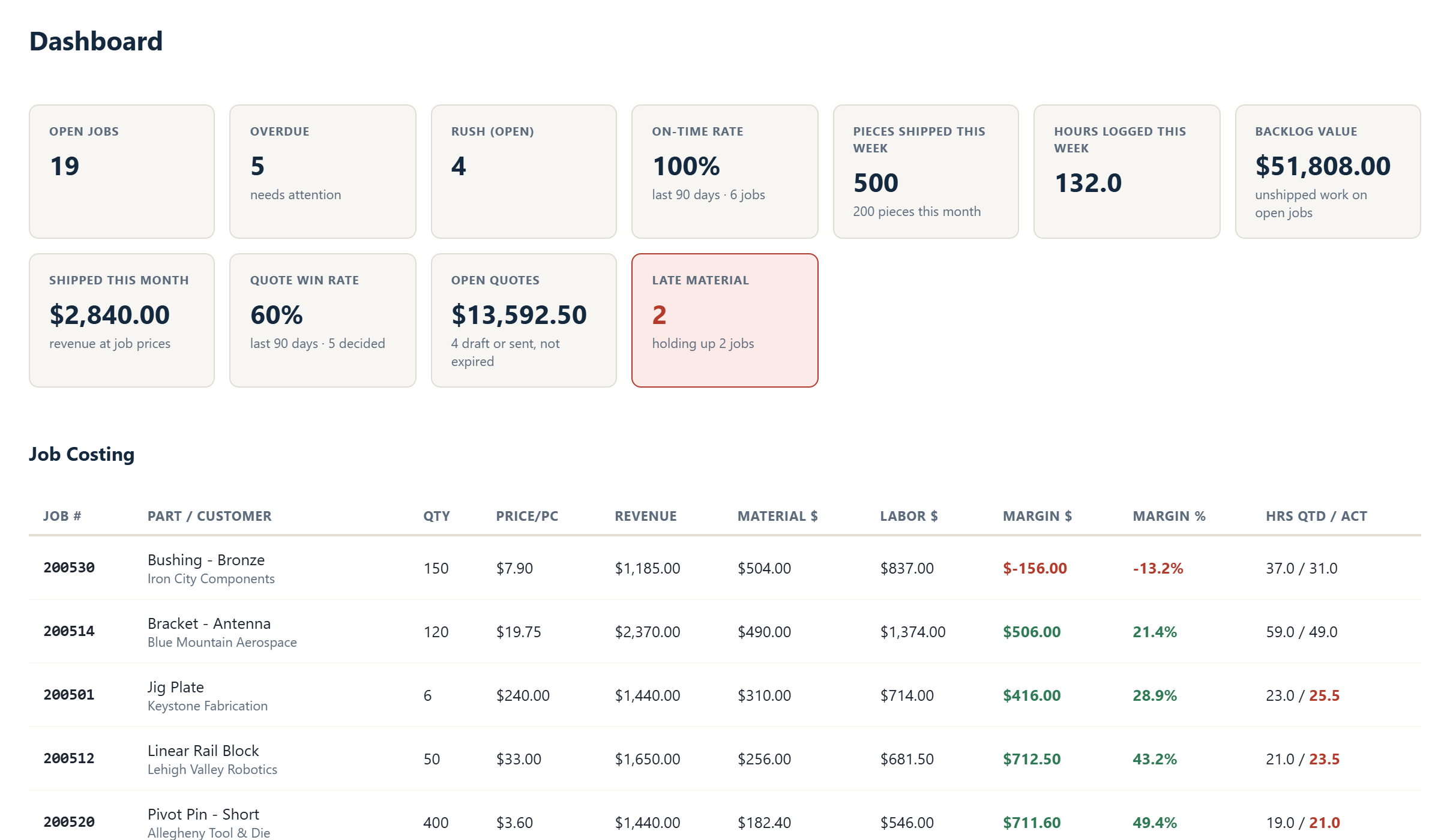
Job costing and dashboard

See which jobs actually make money.

Revenue, material and labor side by side for every job, updated as material is bought and hours are logged. No spreadsheet, no end-of-month guessing.

  • Material cost from the job's purchase orders
  • Labor from logged hours times each person's rate
  • Quoted hours against actual hours
  • Sorted worst margin first, so problems surface
  • On-time rate, backlog, win rate and late material at the top
Pylvos dashboard and job costing
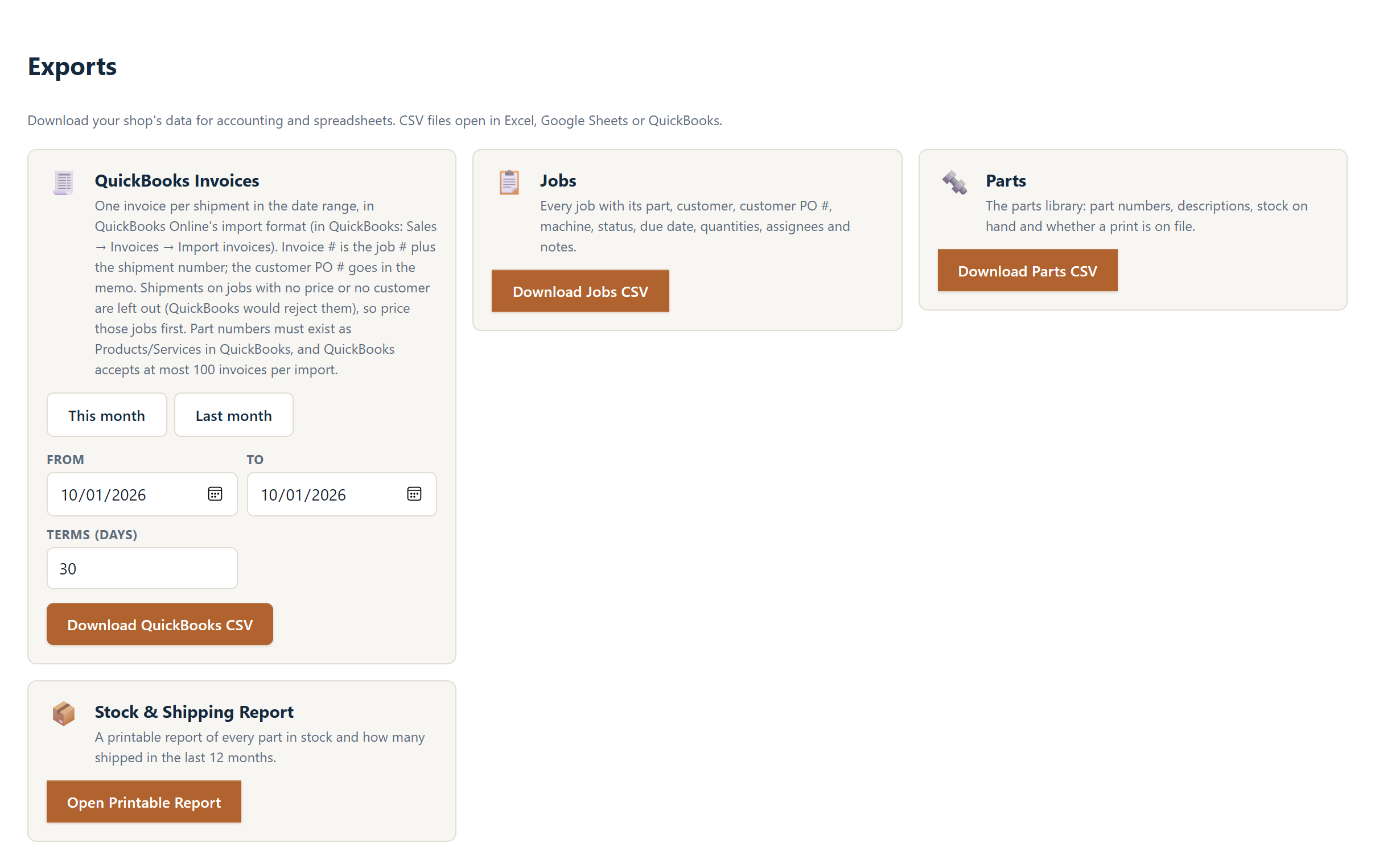
QuickBooks invoice export

Invoice from what you shipped.

Pick a date range and download a file QuickBooks Online imports as invoices: one per shipment, with the job number, customer PO, part, quantity and price filled in.

  • Invoice numbers built from the job and shipment number
  • Customer PO number in the memo
  • Jobs and parts also export to CSV for Excel or Google Sheets
Pylvos exports page with QuickBooks invoice export
Getting started

Up and running in an afternoon.

No IT department, no server to configure, no router settings.

1

Install

Run the installer on any Windows PC on your shop network. Pylvos runs in the background and starts with the PC.

2

Set up your shop

Enter your key, name your shop and add your people. Import your prints folder in one go.

3

Open it anywhere

Anyone on your Wi-Fi types pylvos.local or scans the QR code. Nothing to install on phones or tablets.

Common questions.

Does it work without internet?

Yes. Pylvos runs on your own network, so the shop keeps working when the internet is down. It checks in with our license server once a day. On Standard, after two weeks without reaching us, the Standard features pause until it reconnects. Nothing is deleted.

Where does my data live?

On your hardware, at your shop. Your jobs, parts, prints and certs never leave the building. The only thing that reaches our servers is the license check.

Can my people use it on their phones?

Yes. Any device on your shop Wi-Fi opens Pylvos in a browser at pylvos.local, or by scanning the QR code in Settings. Many shops keep a tablet near the machines.

What's in Free, and what needs Standard?

Free covers the shop floor for up to 3 people: the job board, calendar, parts library with prints, comments and status history. Standard ($40/month) adds certs and signed COCs, quoting, purchase orders, suppliers, customers, job costing, time tracking, supervisor roles and unlimited people. Compare plans.

What happens if I cancel?

Your data stays on your PC. You keep Standard until the end of the period you paid for plus 7 days, then Pylvos runs on the Free plan. You can still view your quotes, purchase orders and certs.

What's your refund policy?

All payments are final and non-refundable, which is why there's a Free plan and a 14-day free trial of Standard. See our Terms of Service.

Ready to get your shop organized?

Start free on a PC you already have, or try Standard free for 14 days.

Get Started Free Try the live demo Compare plans

Questions? Email sales@pylvos.com.